My Collaborative Inquiry Journey to Date Explained Through Drake

drake-and-me

Today, my colleagues and I focused on the how-to’s of facilitating collaborative inquiry (CI) with an equity focus. In terms of my understanding of CI, I definitely felt that I started from the bottom of the group – I knew I should’ve read more this summer sixteen – but I still felt comfortable enough to share my views and contributed to the group learning. It was a tough day, not gonna lie. It wasn’t the best I ever had because I felt that I wasn’t totally getting some of the nitty-gritty details being presented about CI. Nonetheless, the over-arching message I got from today was that to effectively take care of a student learning need, the challenge of practice and problem statement need to be laser-focused, and that comes with effective questioning, data interpretation, and facilitation.

Even with great facilitation, I anticipate that school improvement through collaborative inquiry will be a hard sell in schools that think they’re too good for a coach and have little room for improvement. I get it – no one wants to do more work (work work work work) than they have to. However, rich data sets can unearth underlying student issues that can give teachers pause and say “hold, on, we’re going home to inquire about this further.” For instance, using student census data, I learned today that East Asian students are generally higher achievers in the TDSB, but report higher rates of stress and anxiety and lower rates of physical activity. Therefore, if an academically successful school with a large East Asian population needs a focus for improvement, perhaps a well-being focus would be appropriate (if the local data supports that as well).

Finally, I don’t anticipate that I’ll be the most popular guy when I come in to schools to support improvement, and I’m coming to terms with that. A principal shared today that no one really wants to get feedback, but we should all work on receiving it. In reality, all I want is to help improve student learning. Lord knows that I won’t make international headlines for saving, say, Mr. Marvins Room of students with the worst behaviour he’s ever seen. It’ll be my job to show him no student is so far gone that they can’t controlla themselves with a little bit of support with self-regulation. Hopefully, he’d at least thank me later.

Ok. I’m done.

The Faces of…

img_0226

On my way home from even more heavy discussions at work around equity in schools, I came by this mural at the corner of Dundas St. West and Cordova Ave. It’s called The Faces of Islington, painted by John Kuna in 2013. It portrays changing demographics in the style of a huge class photo. Beside it is a plaque explaining that the mural “celebrates the ethnic and cultural character of Islington as it has changed over the last century.” It’s interesting that I run into an art piece celebrating ethnocultural differences after discussing how, as a school system, there are different outcomes for students based on their ethnocultural background. I saw some pretty rough data from the TDSB about high suspension rates, lower academic achievement, and higher rates of special education designations for racialized students, particularly students that identify as Black, Latin American or Indigenous. Luckily, those heavy conversations focus around what we can do about all that. I don’t pretend that the equity work that I’ll be doing will be easy – I expect it to be messy and painful – but I know the work is worthwhile and necessary. My hope is that mural on Cordova will one day reflect a true celebration and respect of different cultures – that is, when children’s cultural and socioeconomic backgrounds don’t become barriers to success. Now that would make a nice picture.

I Got Schooled on my Unconscious Biases

As someone that identifies as being progressive and equity-focused and has intensely studied anti-oppression education not even six months ago, I thought that I was “enlightened” and conscious of all my biases – clearly I was wrong – dead wrong. I assumed a surgeon was automatically male. I was shocked that Yassmin was part Danica Patrick, part Floyd Mayweather, and part Mark Wahlberg in Deepwater Horizon rolled into one kick-ass Muslim woman. However, I felt relieved that this unconscious bias was uncovered in a safe space with many amazing colleagues rather than somewhere else with less understanding folks, and as a result, I was able to use this moment as a learning opportunity. As a coach, I’ll be tasked with uncovering the biases that exist within teachers I’ll be working with. This work is going to be crucial in order to move forward with promoting equitable learning environments for students. I only hope that I’ll be able to develop a safe space such that the unpacking of biases leads not to feelings of shame or teachers becoming defensive, but to understanding how bias negatively affects student outcomes and begin a conversation to move beyond that.

What can educators control or influence in classrooms?

influence

I’m beginning my new role as a learning coach in the Toronto District School Board, and my goals for the year include being a more reflective practitioner and to model transparency. I’ll be blogging to share my journey through this new role (one in which I am both extremely excited and terrified) so that others may get a glimpse into the life, struggles and (hopefully) triumphs of a TDSB learning coach and offer any thoughts on what I write about. More importantly for me, I’ll be using it as a tool to help gather my thoughts and consolidate my learning for my own sake. Basically, I need to write to think about stuff, and you’re welcome to come for the ride…

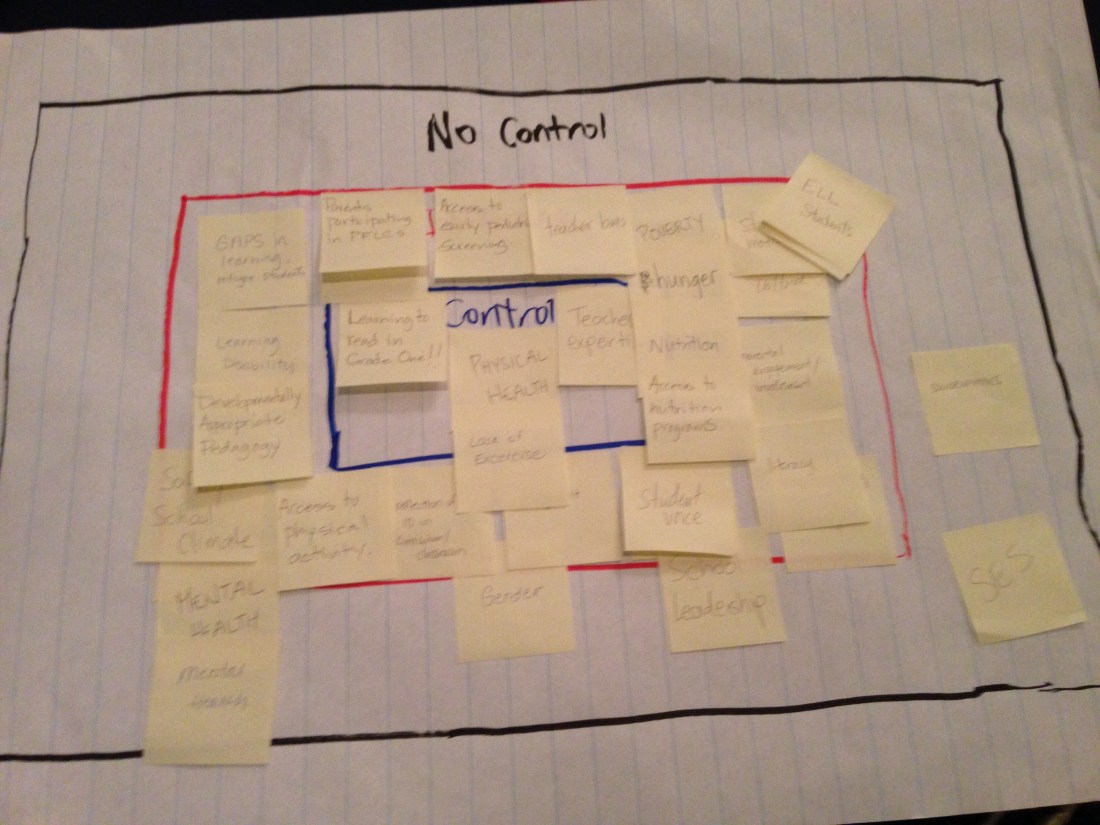
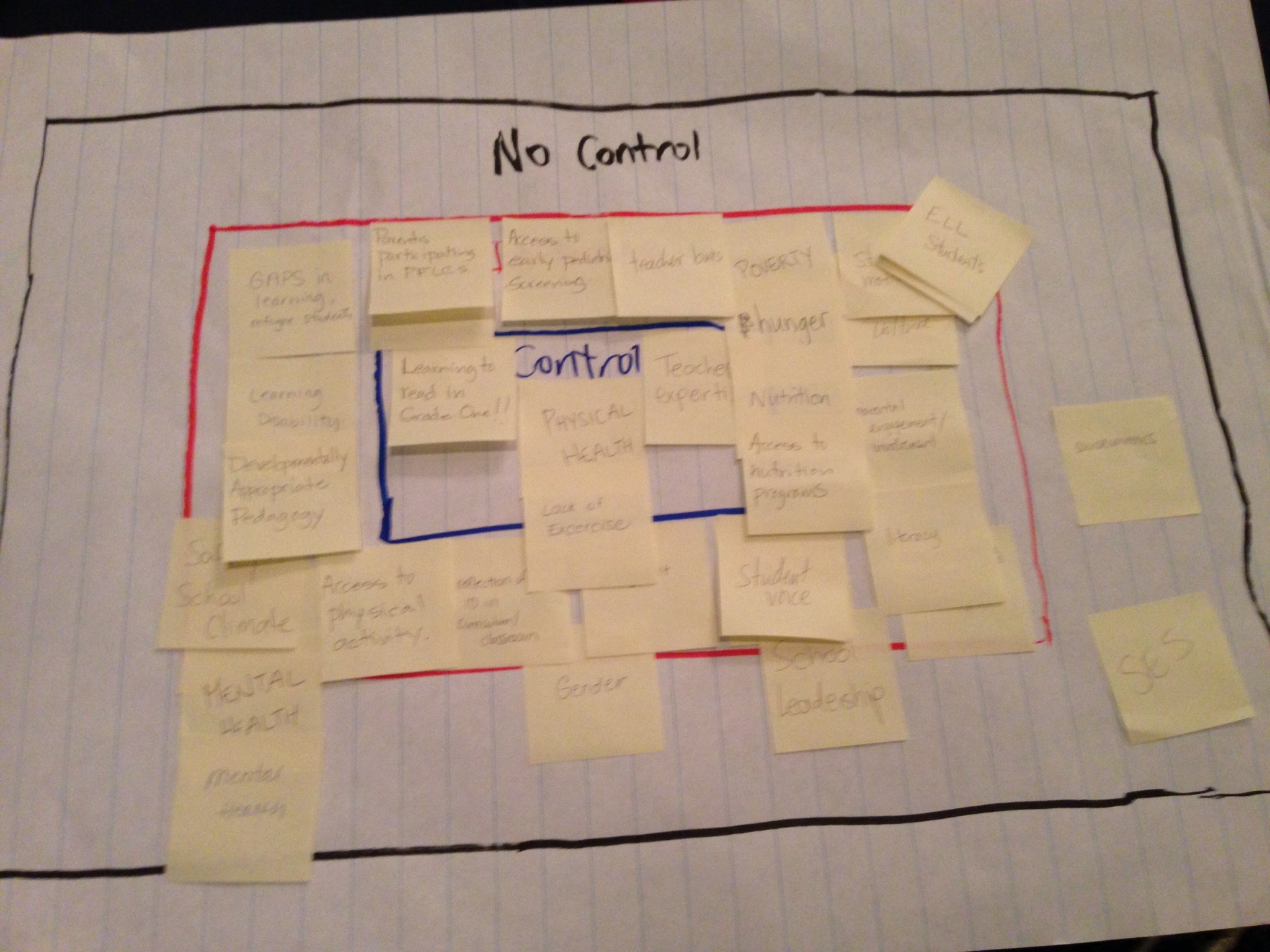
What factors impact student success, and which of those factors do educators have influence or control over? That was one of the activities that learning coaches in the TDSB engaged in during two days of professional learning. Individually, we listed as many factors that we can think of on post-its. Afterwards, we placed each of them in one of three rectangles on chart paper: no control, influence, or control. Small-group discussion followed regarding their placements.

Most of the factors that my group identified were placed in the “influence” rectangle, with a few in the “control” and “no control” areas. Initially, I thought that “teacher expertise” was a factor that I as a learning coach will be able to control, seeing as I will be working directly with teachers to improve their practice. However, one of my colleagues, Jim, shared that he feels that as a coach, he can only influence what teachers do and he would never want to control how a teacher performs. Jim shared that as a teacher, he would never want anyone to control what he did in the classroom. I agreed. As coaches, my goal should be to guide teachers and promote good practices, and never pressure anyone, implicitly nor explicitly, into doing things a certain way.

Finally, there are some factors that affect student achievement that are not controlled by educators, such as a student’s socioeconomic status (SES). However, such factors and their negative effects on achievement can be mitigated by schools. For example, students in low-SES environments may not achieve due to a lack of food or transportation to school. In response, schools can provide nutritional support (such as free lunches or snacks) or busing services to mitigate those factors. Barriers to student achievement may seem uncontrollable, but with a bit of thought and ingenuity, they can be removed. That’s just one way equity work is crucial in improving student achievement.

Altogether, this activity was a great reminder for me that educators can influence pretty much anything that factors into student achievement, and that I play a role in that as a learning coach. As such, my professional learning will continue to centre around the skills and mindsets I need to help influence teachers to improve their practices for the benefit of students.

Using Google Apps to Support “At-Your-Own-Pace” Learning in a Special Education Grade 9 Academic Math Class

Ever get that feeling that when you’re teaching a lesson, only a handful of students are with you, while most are either lost because they have huge knowledge gaps or bored because they already understand and just want to move on?

Well, that feeling hit me hard three weeks ago. I was teaching Grade 9 Academic math to my wonderful special education class of 14 students who have all been either diagnosed with a learning disability or have struggled with numeracy in the past. In either case, only one student is working “at grade level”, with most having completed Grade 4-6 math curriculum expectations last year. The challenges of teaching students with significant knowledge gaps, a wide spectrum of prior ability, and differences in processing speeds and learning preferences were exacerbated by teaching them the highest stream of math in Ontario (in case you’re wondering, my school eliminated the Grade 9 Applied math course and placed only a handful of students into a locally-developed class because of the evidence linking streaming in schools to poor academic and social outcomes for students, particularly in low-income neighbourhoods – it’s an equity issue).

After two weeks with my group, most students were struggling either because they couldn’t keep up or they had attendance issues and missed out on prior learning. I was determined to teach them Grade 9 material and have them excel at grade level, but I knew the status quo wouldn’t work. So, I took a page from Heather Theijsmeijer and designed a class structure that gives students the choice to learn using different media, but also the flexibility to learn at their own pace.

Basically, using Google Docs, I’ve laid out the topics of study, a couple of ways students can learn each topic, and how they can consolidate these topics. Students access these docs via a class Google Site, and they go through the topics at their pace. Here’s an example of a unit layout:

Since this whole class design was done on a whim, some topics are a bit lacking in terms of the additional web resources. I’m hoping to build that up in the next iteration of this design.

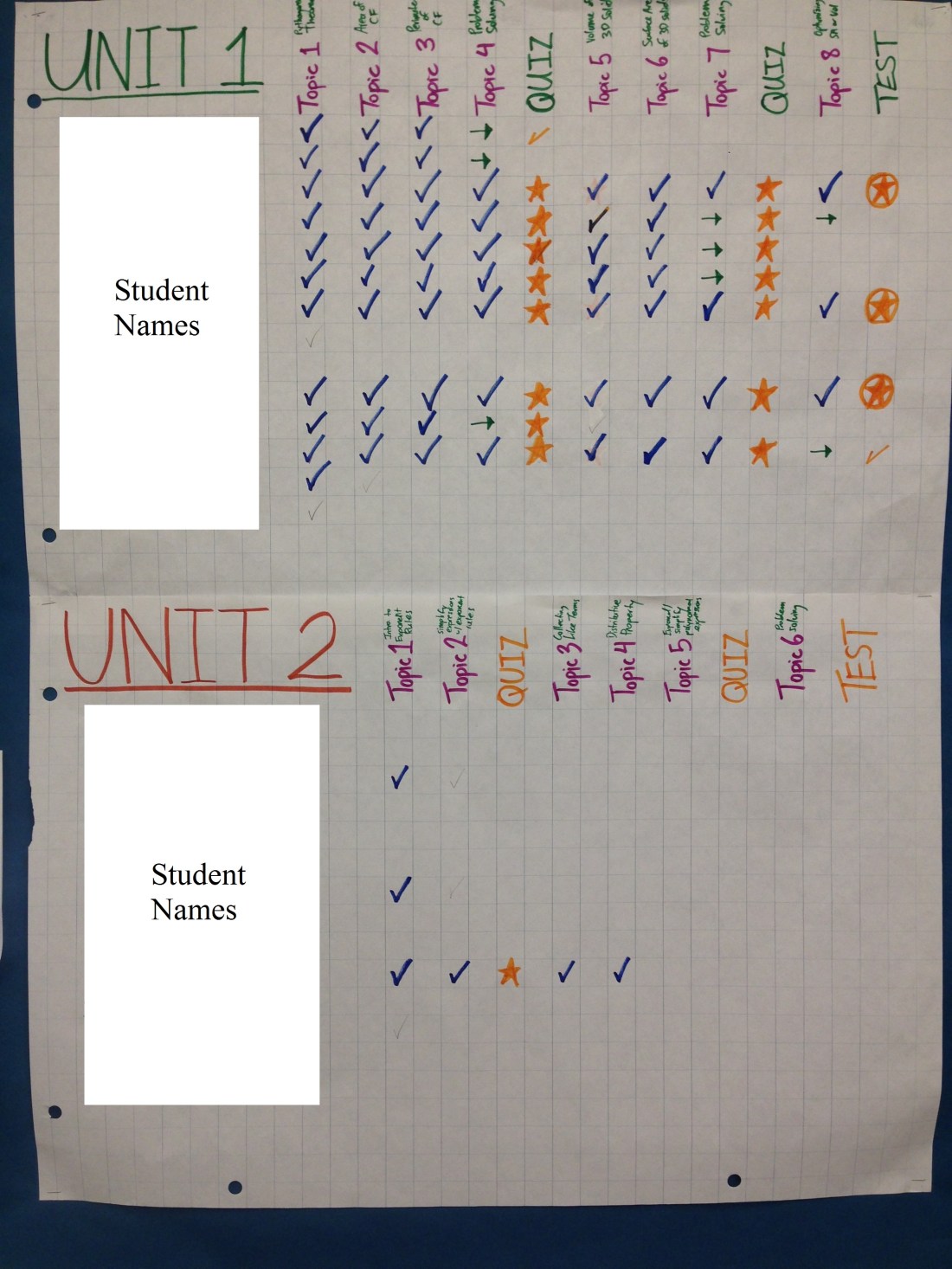
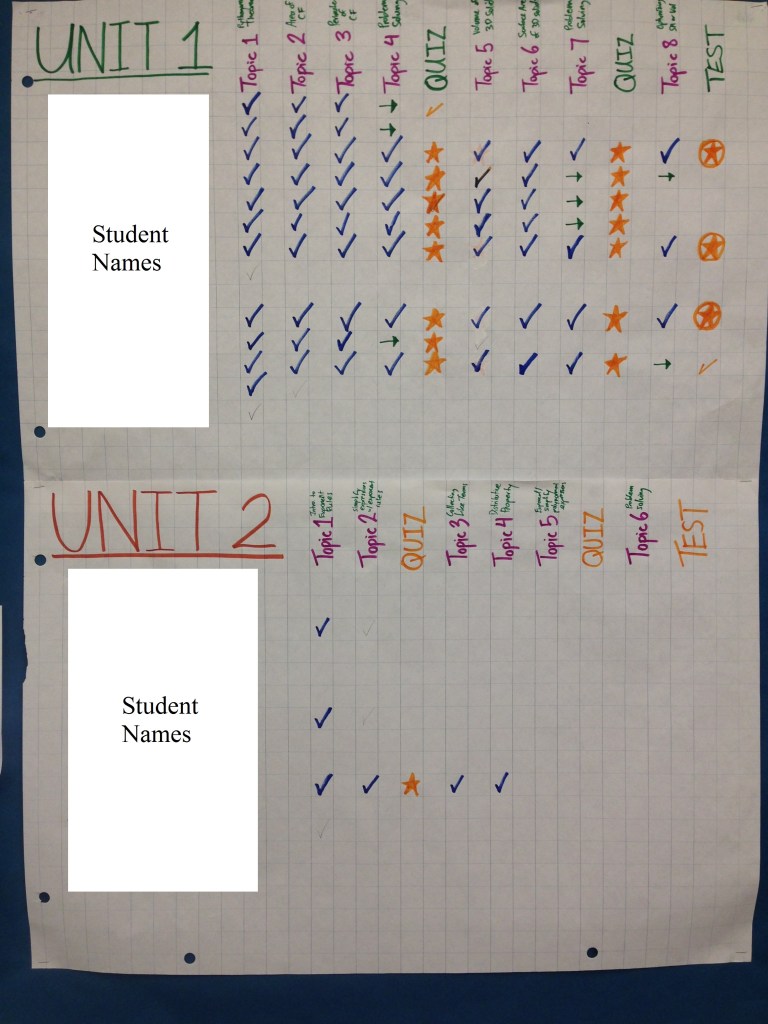
In class, students either use their own devices or borrow a tablet to access the content. They learn (usually by watching the YouTube video), ask questions, try some problems, I assess them by observing what they’ve done and conversing with them, and then they move on. I track their progress with a chart:

IMG_0084

(The chart’s analog, I know. Sometimes, though, a physical copy just makes things feel more tangible)

As you can see, students are all over the place in terms of their progress. Only about half are on the pace that I was hoping for, but that’s okay. The whole point is that students take the time they need to learn a concept. As the semester continues, I’ll ask students to put in some extra time to catch up.

With this new design, students are always on a topic that they can understand. If a student has been absent for a few days, they just pick up where they left off. So far, every student has been on-task, engaged, and most importantly, successful. Most students are getting over 85% on evaluations, and no one is below 75%. I recently asked for some feedback via a Google Form, and 9 out of 10 students are happy with how things are going so far. Here are some of their comments:

“Everyone learning at their own pace gives everyone a fair chance to learn.”

“I really like it when we we can watch the videos then do the questions after so I can learn how to do other shapes and sizes [in measurement].”

“I like that we use tablets to help us do our work.”

“I like working at my own pace due to the fact that it takes me time to understand something.”

For myself, I’ll admit that it’s been weird acting as a facilitator in class rather than being the typical teacher at the front, but it’s also been incredibly liberating. I get to work one-on-one with everybody and have a chance to conference with students on a regular basis. The work to get these units organized ahead of time is bananas, but it’s worth it. I know it’s been only three weeks, but having students work at their own pace has really created a differentiated environment that has so far been very successful. I see myself using this design for all my classes from now on. Having said that, I’ll keep my fingers crossed over the next few months. I’ll keep everyone posted!

If you’ve tried an “at-your-own-pace” approach, how did it go? Are there any pitfalls that I should be aware of? What are your thoughts on having students work like this? Leave me a comment!

3 Ways I’ve Used Google Apps to Help my School Run a Bit Smoother

Googly Docs and Cloud Computers

Over the past few years, much has been said about how Google Apps for Education (GAFEs) have improved student learning and also how students demonstrate their learning. They can now collaborate online on the same Google Document or Presentation, create surveys that can be taken by students from halfway around the world, and teachers can annotate and embed feedback during the creative process in real-time to help guide students along. Of course, this is just the tip of the iceberg with respect to the functionality that Google Apps offer for students and their teachers. However, these tools are also useful for supporting teachers with some of the behind-the-scenes work that needs to be done in order for a school to function. Here’s just three modest ways that I’ve used Google Apps to support teachers:

1. Using Google Docs to create a sign-up sheet for a computer lab

Before: Prior to using a Google Doc, teachers would reserve a computer lab by going to the main office and writing their name in a calendar beside the period in the day they wanted the lab. Simple enough. However, there were clear drawbacks to this system: (1) the main office closes at 4pm, so if a teacher wanted to reserve the lab after 4pm, they were out of luck; (2) if a teacher is at home and suddenly has a great idea for a computer activity the night before they want to try it, they’d have no way of knowing whether or not the computer lab was available the next day; (3) personally, the main office was at the opposite end of the school, which made going there a bit inconvenient (I hate wasting time walking all the way there – sue me).

After: Today, we use a Google Document that, well, actually looks just like the paper sign-up sheet that was in the main office, but now it’s accessible anytime, anywhere:

Room 300 Signup Sheet Screenshot

You may wonder why I didn’t just use some online scheduling program or Google Calendar. To make a long story short, they weren’t customizable enough to meet the often-changing schedule of my school (the period times on Thursdays are different than other days, and not all Wednesdays are the same). Also, the Google Doc looked just like the original piece of paper that people were used to, so it created a sense of familiarity and continuity. So far, I’ve had nothing but thumbs up from teachers about this migration to a digital sign-up, so I’m chalking it up as a success.

2. Using Google Spreadsheet to create a school-wide parent/guardian contact log

Before: Teachers are expected to call students’ parents/guardians regarding their concerns, but particularly with regards to attendance issues. However, there was no central record of these conversations. Perhaps these conversations weren’t even happening. Also, it may be good to know if other teachers were calling home to the same student about similar issues. So…

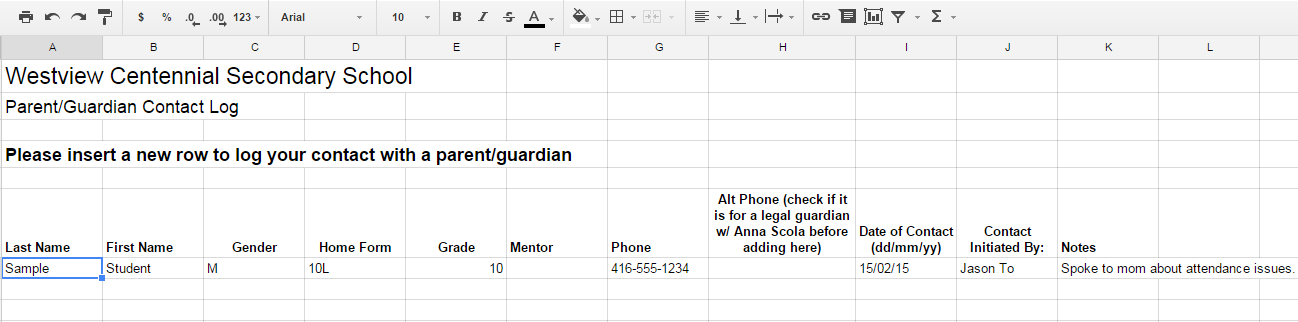
After: Based on the original idea from Saraya Elwin, a colleague at Westview, we created a Google Spreadsheet that has student names and contact information, along with fields to log the phone conversation. Here’s what it looks like (without real student information):

Parent-Guardian Contact Log Screenshot

Not only does this log provide some valuable information for teachers with respect to coordinating parent contact, but it also provides a level of accountability for teachers to actually make the calls that are needed to ensure our students get to class and learn.

3. Using Google Forms to coordinate the school’s Oscar pool

Okay, so maybe this doesn’t exactly fit the category of making the school run smoother, but running an Oscar pool creates a sense of community and makes for a positive work environment:

Oscar Pool Screenshot

It’s also a fun and non-threatening way to show my colleagues what’s possible with Google Forms. In addition, because the picks are organized into a convenient Google Spreadsheet, scoring the results after the Academy Awards are over will be a breeze, so the winner gets their prize on the Monday.

What’s next? I’ve got a few other ideas brewing:

  • Supporting staff timetabling using Google Sheets. My school luckily allows input from department heads regarding the timetabling of teachers. We can suggest moving teachers here and there, changing their original teaching assignments to subjects that they would prefer to teach. However, many teachers are in multiple departments, so coordination between department heads is key. Last year, everyone had separate chart papers, logging changes with drawn-in arrows, and different versions of edits were floating around everywhere, leading to quite a bit of confusion. Next time around, I’m hoping that we all use a Google Sheet so that everyone’s working on one document and writing comments to log conversations so confusion is kept to a minimum.
  • Schedule meetings on Google Calendar. Many schools do this already, I’m sure. At my school, lots of things are going on, and planning meetings so that they don’t conflict with one another would be a big bonus. My hope is that next year, meetings are logged on the school’s Google Calendar so everyone knows what’s happening and that meetings are coordinated.

How has your school used Google Apps to make administrative tasks easier? Are there other tools to do what I’ve been doing even easier? I’ve love to hear other ideas.

Tim Hortons and proportions: When half-sugar isn’t really half at all

Like many sleep-deprived Canadians, I begin my morning routine with a rejuvenating cup of coffee. Whenever I’m too disorganized to make one at home, I’ll order one from Tim Hortons (for my non-Canadian readers, Tim Hortons coffee is basically as popular in Canada as water is to fish). Lately, I’ve been trying to cut down on the amount of sugar that I take with my daily cup of Joe. I’ve historically taken my medium-sized java with one serving of sugar. Then one day, I cut it out entirely, and life became really awful. So, I now order my coffee with a half-serving of sugar as a compromise between health and happiness. I know I’m not the only one on the planet who orders half-sugar, because there’s a dedicated “half-sugar” button built in to the Tim Hortons computerized register. However, the manner in which this half-sugar is served got me thinking: since the Tim Hortons workers push a button on the automated sugar dispenser corresponding to the size of the cup, how would they account for a half-serving? Do they simply dispense sugar that’s meant for the size below instead? Two sizes below? Just what’s going on back there?

After some investigative work, including a source from the inside (i.e. a relative of mine currently works at Tim Hortons), there is no hard-and-fast rule for half-sugar orders. Some workers may press the size below, or two sizes below – it just depends on the person. So, if that’s the case, is half-sugar really ever half?

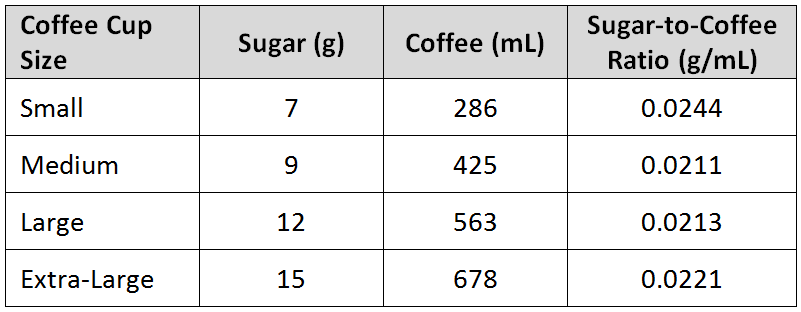
Here’s what I’ve been able to uncover using Tim Hortons’ own Nutrition Calculator. Below is a chart of coffee cup sizes, the number of grams in a full serving of sugar for each cup (this would be relatively consistent as it is dispensed by a machine), the amount of coffee per cup size (of course, this will vary depending on the actual pour), and a ratio of sugar-to-coffee (the greater the number, the sweeter the drink):

Tims Sugar
Source: Tim Hortons Nutrition Calculator

Before we even talk about the half-sugar serving issue, notice that a small cup of coffee is, theoretically, about 15% sweeter than the other coffee sizes. A 6g serving of sugar for a small cup would actually make it more in line with the other drinks (the sugar-to-coffee ratio would be 0.210 g/mL). Just thought I’d point that out.

Okay, back to the half-sugar. Let’s assume that I get my typical medium-sized coffee. If the Tims server accommodates my half-sugar request by dispensing a small coffee’s worth of sugar, I’m not actually getting half at all (7g vs. 9g of sugar). It’s really more like three-quarters sugar (78% actually). As a guy trying to limit my sugar intake, this is simply outrageous! When I, a math guy, say half-sugar, I’m expecting half. Period. Unfortunately, I’m unable to comment on the results if an extra-small coffee’s worth of sugar is dispensed, since Tim Hortons no longer serves nor provides nutritional information on extra-small coffee (nonetheless, the button on the sugar dispenser for extra-small is still present). If we were to look at a large or extra-large coffee cup, however, not only does the size below not meet the half-sugar requirement, the sugar for a cup two sizes below is still not half either! Therefore, it’s reasonable to assume that an extra-small sugar for a medium coffee also wouldn’t work. Regardless of the half-sugar dispensing technique (one vs. two sizes below), half is never half! If this is not a scandal of epic proportions (pun intended), I don’t know what is.

Do you take half-sugar with your coffee? Are you as outraged as I am? Now that I’ve brought your attention to Sugar-gate, help me raise awareness of this coffee calamity by emailing Tim Hortons and voicing your utter disgust with this mathematical misinformation! Send them the link to this blog post and let them see for themselves the sugary scandal that they’ve created. Tweet them with the hashtag #HalfMeansHalf and let them know that you won’t stand for this any longer! I’m so angry right now! THIS IS SPARTA!!!

Are giving grades the problem with education, or is it how we generate grades?

BW_June_ReportCard

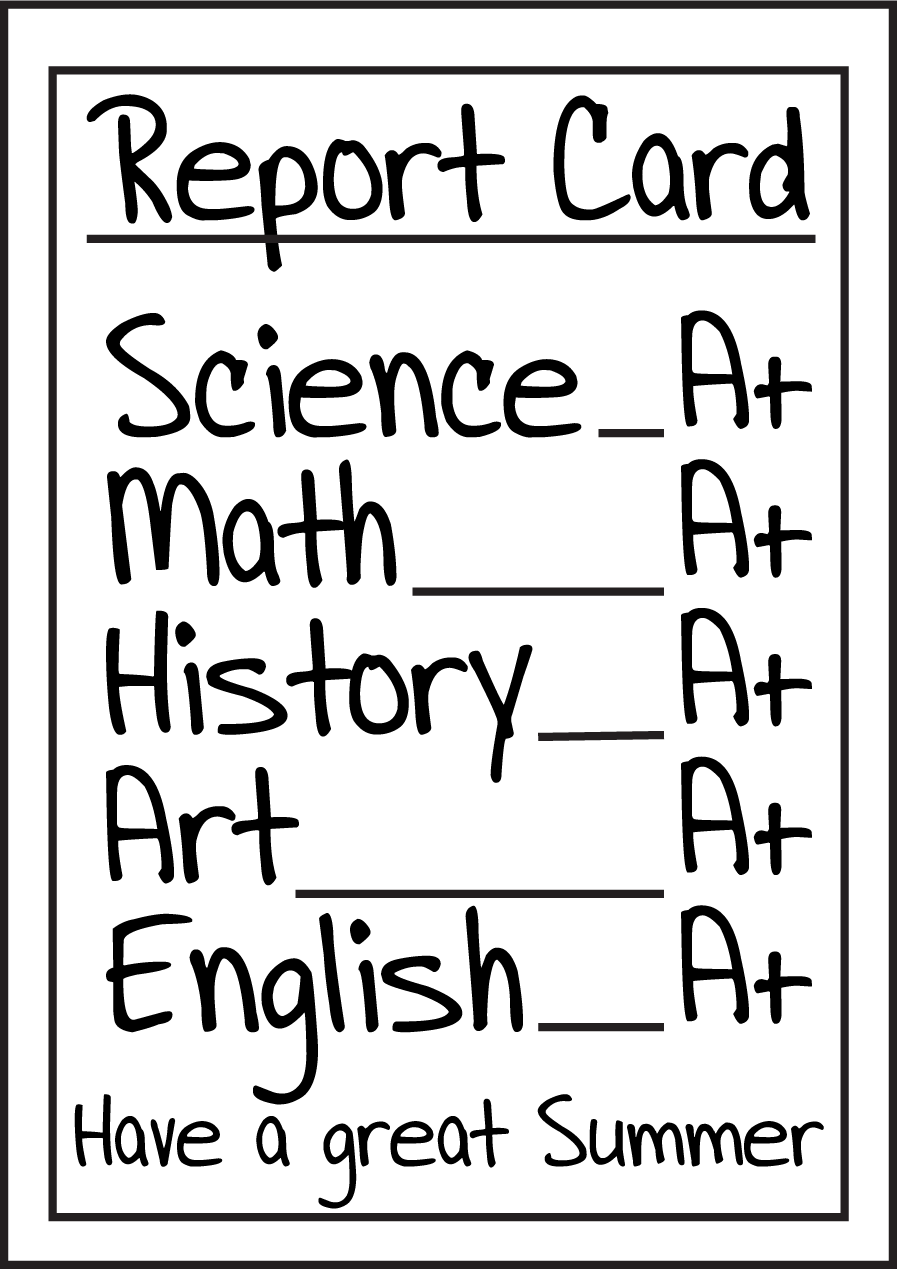
Last week, there was a provocative piece in the Globe and Mail regarding the practice of grading and its effect on student learning. The author, Elyse Watkins, feels that grading negatively affects those students who need more time to learn, and grades have essentially become a currency that teachers and professors “pay” students for good work. She believes that alternative methods of assessment other than tests and assignments, as well as alternative teaching structures will promote lifelong learning for students. If you read the comments at the bottom of the article, you’ll see many people, particularly those in post-secondary teaching, vehemently disagreeing with her. From my perspective, the practice of grading itself is not the problem. Rather, it’s how educators promote learning and generate grades that should be carefully analyzed.

I agree that it’s important to have alternative ways of assessing students. In Ontario, grades are supposed to be assigned to students as a judgement on their learning and understanding of course concepts. That judgement should be informed by all sorts of means. Tests, quizzes, and assignments are the traditional items that teachers use to see how much students have learned. However, teachers are encouraged also to use observations of and conversations with students to further identify the amount of learning that they have attained. So, for the student that has difficulty with test-taking, but can demonstrate their knowledge brilliantly with a one-to-one conference, such alternative methods of assessment are to their benefit.

Teachers should also be assessing students throughout the learning period and providing corrective feedback so that when judgement must be passed, students will be ready to prove their learning. For me, if I’m giving a test after, say, 15 classes, I will have checked throughout the 15 days that students are learning or not, and provide feedback and opportunities to get better and better. I don’t give grades during the learning period – that`s the students’ time to figure things out, and they shouldn’t worry about making mistakes during that time. I don`t wait for test day to see whether students “get it” or not. By then, I will have checked and helped students many times over.

Grades should never be considered currency, as Ms. Watkins puts it. Unfortunately, it happens sometimes. I overhear teachers giving students grades (or taking marks off) according to behaviour. Since grades should be a judgement of learning and not how well a student is behaving, this is clearly a misuse of the system. I have also seen teachers dangle marks like bait, making students complete assigned work to get them. Again, since grades are a judgement on learning, there are other ways to see student understanding. It doesn’t have to be a transaction of work for marks. Finally, grades are used to differentiate higher-achieving students from lower-achieving students for many reasons – admission to post-secondary schools, scholarships, or employment. Do I believe that grades shouldn’t be used as a tool to choose the best candidates? No, but it should be only a part of a more holistic way of evaluating a person. Grades tell one narrow part of a story.

Grades aren’t going anywhere anytime soon. However, how we come up with grades can be greatly improved.

What do you think about grades? Should we can them? Do we need to standardize grading? I’d love to hear your thoughts and experiences.

Three Observations from Implementing a Bring-Your-Own-Device Approach in my Classroom

FullSizeRender

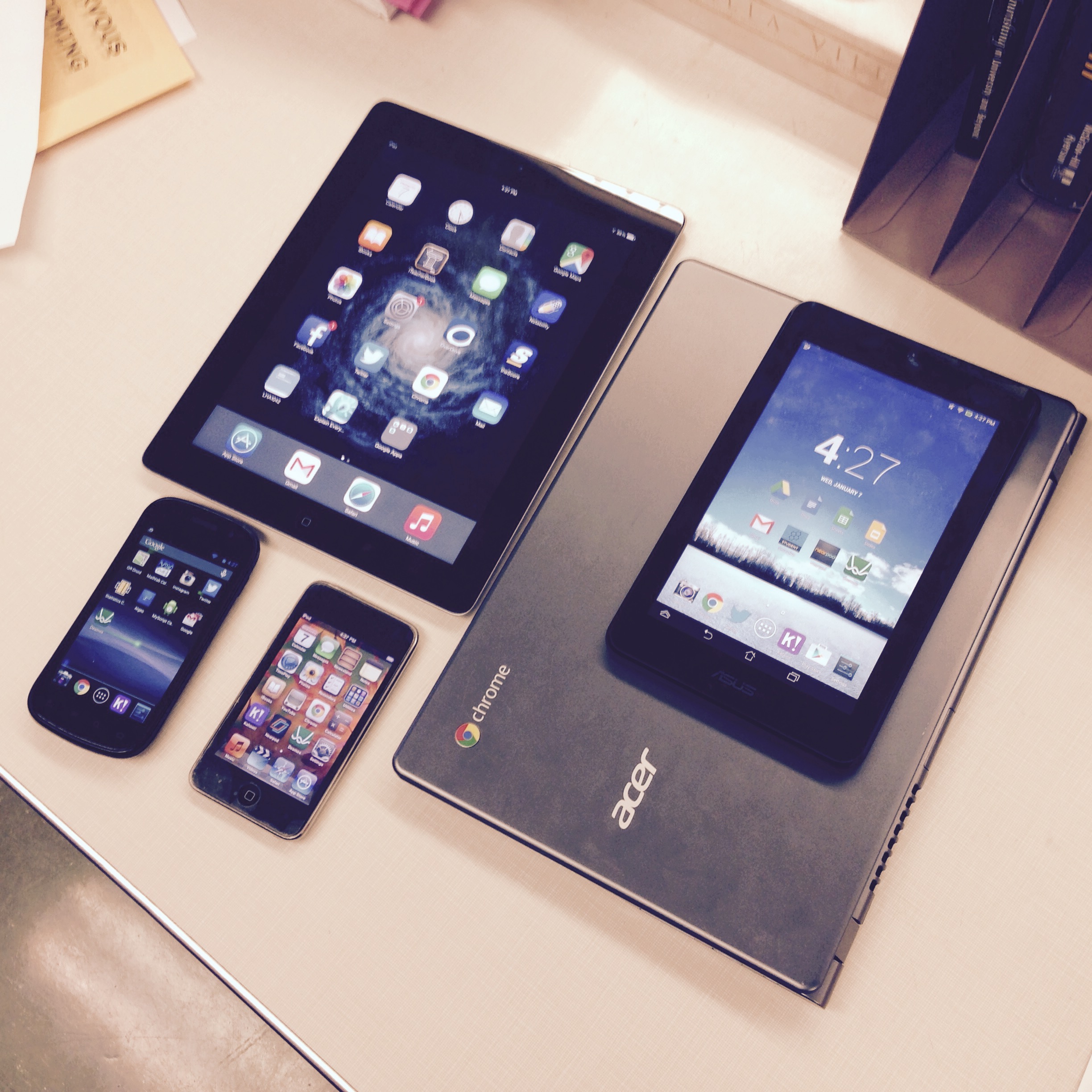
I must admit – I’m a tech-hoarder. Here’s a picture of all the devices that I have been able to collect or purchase so far to help implement a bring-your-own-device (BYOD) environment with my students. I’ve dabbled over the past little while with browser-based apps like Desmos, Kahoot! and Socrative that work with any type of device (Android, iOS, Chrome, Windows) and definitely see how they augment the learning of complex ideas or allow more effective assessment of student understanding. I wanted to write not about any tools that could be used, but rather three interesting things that I’ve observed first-hand while implementing BYOD.

1. Students look forward to using their devices for learning, unless they’re at low battery

As a whole, students are totally into using their phones and iPods for class activities. However, I’ve had times when one or two students say they don’t want to participate because their phones are at 8% power. Nowadays, if the BYOD portion of a lesson is later in the period, I give students a heads-up and allow them to charge their phones in anticipation. I carry some extra USB plugs, micro-USB cords and the odd Apple 30-pin or Lightning cable in my drawer in case anyone needs them. In the future, I’m hoping to make a DIY charging station, like these beauties, for my classroom (I’ll have to channel my inner Martha Stewart).

2. In an BYOD setting, understand that students will do others things on their devices once in a while, but minimize it whenever possible and don’t be mean about it

With lots of devices comes lots of responsibility. Devices can obviously act as distractions for students, even when they’re in the middle of using it for educational purposes. In my class, I see students on YouTube, texting, or on social media all the time. Rather than making things punitive and nasty, I simply nudge them back on task, or start reading out loud what they’re messaging, which usually gets them to stop quite quickly. It’s near-impossible to monitor the use of thirty devices by thirty students, so vigilance is key, but I also accept that students will from time to time do something else on the devices, and it’s okay, as long as it’s not a huge distraction. Even pencils and paper can be a distraction if people start doodling; that doesn’t mean we don’t allow students to use pencils and paper, right?

3. Equity of access to mobile devices is an issue, but not THAT big an issue

Just because many of my students come from lower-income families doesn’t mean they don’t have mobile devices. From my data collection, roughly 60-80% of students will have a device that they can use. Perhaps it’s part of the teenage culture of conspicuous consumption, or pressure that students exert on their parents/guardians, but the majority of students in any given class will typically own a device. For those that don’t have one, I allow them to borrow for the period the aforementioned top-up devices that I’ve collected over the years. Without top-up devices, students who don’t own devices will definitely feel excluded; therefore, they are a must in any BYOD environment, in my opinion.

As school budgets start to get tight, BYOD will be the only viable strategy to involve technology use in classrooms. The Toronto District School Board is behind other boards like Peel DSB that have official policies and supports around BYOD implementation. Students definitely enjoy using their own devices, but some challenges, like charging and distractions, come with the territory. We shouldn’t let these issues get in the way of integrating technology for the benefit of student learning.

P.S. For more info on BYOD in education, here’s a great site.

Using Twitter to Show Student Work During Instruction

Screenshot 2015-01-05 at 9.21.56 PM

Now that school’s back in session, I can finally start blogging about some really educational stuff (not that meeting Paleo authors wasn’t cool or anything).

For the past semester, I’ve put an emphasis on showing student working during instruction. Since I don’t have the luxury of a document camera in my classroom, which would make projecting student work a cinch, I thought of using Twitter and my own smartphone instead, along with my computer and digital projector, to project student solutions for everyone to see. Basically, when students are working on solving a problem that I’ve posed, I circulate and identify one or two solutions that I feel would be worth sharing to the whole group. Using my phone, I take a picture of the solutions, upload them to a Twitter account that I use for this kind of thing, and then display the tweet and photo using my computer.

There are many advantages to displaying student thinking for all to see – it doesn’t have to involve Twitter: (1) often there are a variety of ways to approach a math problem, so showing some off and discussing them sends the message that there is never one correct way to go about solving a problem; (2) I have found that students are more likely to look at someone else’s work than the work that a teacher puts up; (3) students, especially those who haven’t historically felt much success in math class, are eager to have their work shown off and are proud when their work has been chosen as the focus of discussion; (4) it gives students more of a voice during a lesson; (5) students can always look at the Twitter account from their own devices/computers at a later time to look at some sample work.

I envision this idea of using Twitter to show student work expanding in a 1:1 iPad or BYOD (bring-your-own-device) environment where all students have some kind of a mobile device. Each student can create a class-specific Twitter account and can then use their own devices to take photos and upload their work to share, rather than having the teacher do it. A hashtag could be used to make finding student tweets easier.

From my 5 months of experience using Twitter to show student work, I have found it to be very effective in hooking students and also sharing quality work amongst everyone. I would recommend others to try this out, especially if you don’t have a document camera. I think there’s also a mild cool factor that attracts the students because it involves Twitter, something that’s pretty hip with the young ones these days. If anyone can think of a way to show student work using SnapChat, send me an email,